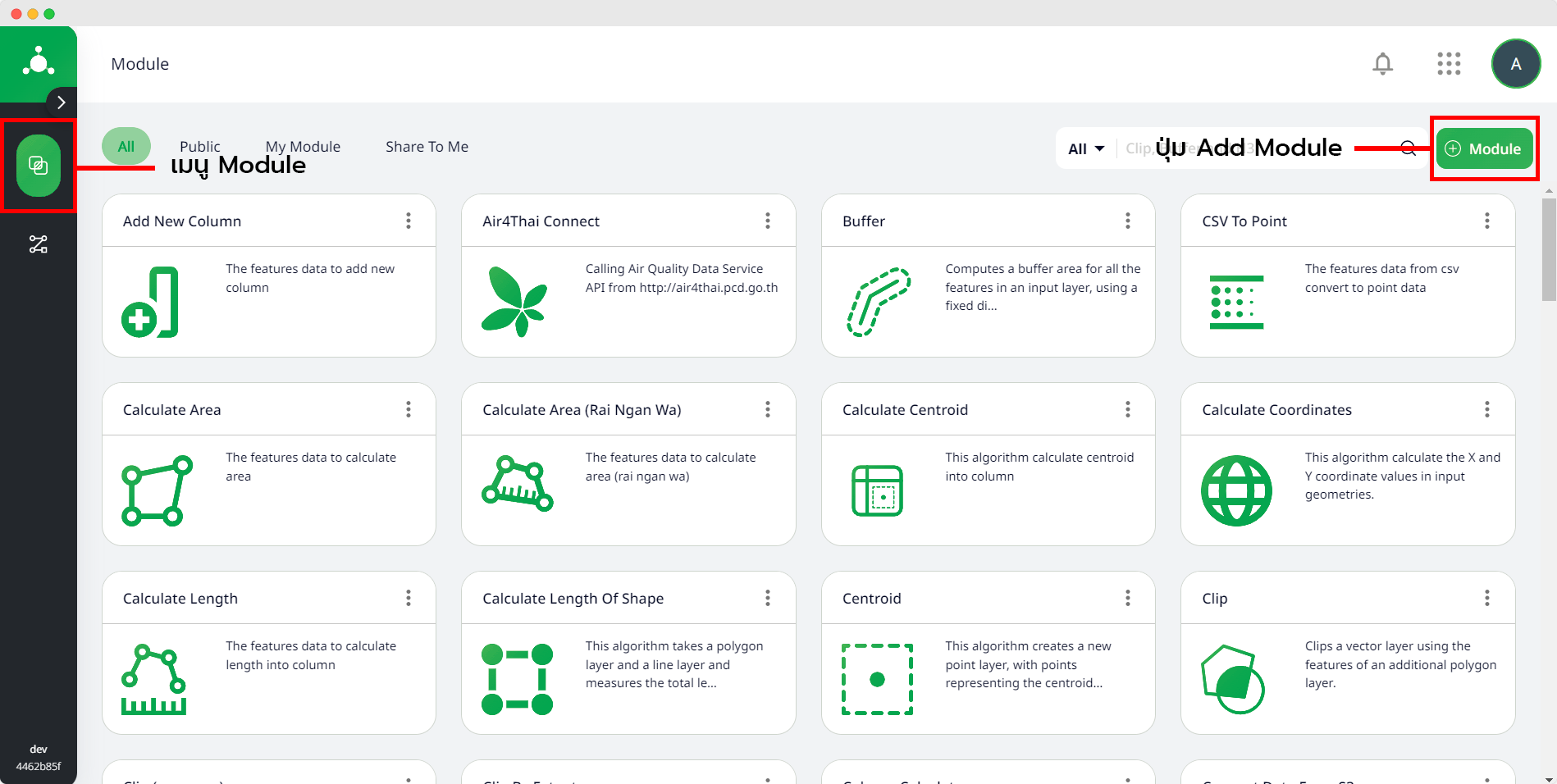
Add Module
การเพิ่ม Module หรือ Register Module ซึ่งหลักการของการเขียน Module จะประกอบไปด้วยข้อมูลที่นำมาใช้ในการประมวลผล (Input) พารามิเตอร์ที่นำมาใช้มาใช้ในการเขียนฟังก์ชันของการประมวลผล (Process Function) และผลลัพธ์จากการประมวลผล (Output)
ผู้ใช้งานสามารถเพิ่ม Module เป็นของตัวเองได้บน Vallaris Map Platform โดยการสร้าง Vallaris Module เพื่อใช้ในการประมวลผลข้อมูลเป็นการเขียนขึ้นโดยใช้ภาษา Python ซึ่งจำเป็นต้องใช้ Vallaris Library และต้องทำการกำหนดข้อมูลและพารามิเตอร์ที่นำไปใช้ในการประมวลผล
Vallaris Library
ดูรายละเอียด Vallaris Library ได้ที่ https://pypi.org/project/vallaris/
รายละเอียดเกี่ยวการ Add Module
ไฟล์สำหรับ Add Module
การ Add Module จะประกอบไปด้วย 2 ไฟล์ ดังต่อไปนี้
- perform.py : ไฟล์ฟังก์ชันสำหรับการประมวลผลข้อมูล โดยเขียนด้วยภาษา Python มีการประมวลผลข้อมูลตามโมดูลที่กำหนดใน Yaml File ซึ่งจำเป็นต้องมีฟังก์ชันหลักสำหรับการประมวลผล คือฟังก์ชัน perform ฟังก์ชันอื่นๆ ภายในไฟล์ perform ทำหน้าที่สนับสนุนฟังก์ชันหลัก
- perform.yaml : ไฟล์สำหรับการแสดงรายละเอียดการรับข้อมูล หรือพารามิเตอร์ต่าง ๆ ที่จำเป็นต้องใช้งานใน Module สำหรับใช้ในการประมวลผล
ฟังก์ชัน Perform
ฟังก์ชัน perform มีการรับ parameter เพื่อนำมาใช้งานจำนวน 2 พารามิเตอร์ คือ storage และ parameter ซึ่งหากอ้างอิงตามข้อมูลในไฟล์ Yaml จะมีรายละเอียดดังต่อไปนี้
- storage คือ พารามิเตอร์การรับข้อมูล Input สำหรับการประมวลผล เช่น การรับข้อมูล input ในรูปแบบ GeoJSON
- parameter คือ พารามิเตอร์สำหรับระบุ บ่งบอกค่าสำหรับการประมวลของ Module เช่น ขนาดที่ต้องการ Buffer
วิธีการ Add Module
- เมื่อทำการสร้าง Module และ yaml ในการรับ Parameter ในการนำเข้าข้อมูลเรียบร้อย
- ทำการ zip ไฟล์
.pyและ.yaml - ทำการ Upload Module บน Vallaris
การกำหนด Group ในการ Add Module แยกออกเป็น 3 กลุ่มหลักคือ
- Input ส่วนการนำเข้าข้อมูลซึ่งเป็น Module ที่จะไม่สามารถนำไว้ส่วนสุดท้ายในการประกอบ Pipeline ได้
- Process ส่วนการแประมวลผลหากนำไปประกอบ Pipeline จะอยู่บริเวณส่วนกลางของ Pipeline
- Output ส่วนผลลัพธ์การประมวลผล เป็น Module ที่จะไม่สามารถนำไว้ส่วนหน้าในการประกอบ Pipeline ได้
ดาวน์โหลดไฟล์ตัวอย่างการเขียน Module
- perform.py ดาวน์โหลดไฟล์ Click here!
- perform.yaml ดาวน์โหลดไฟล์ Click here!
ตัวอย่างรูปแบบการเขียนฟังก์ชันในการเขียน Module
import vallaris
import json
import os
import geopandas as gpd
def perform(storage, parameter):

    # get environ
    getEnviron = vallaris.setEnviron(parameter)
    # print(getEnviron)

    # get format
    format = vallaris.FormatValue(parameter)
    # print(format)

    # input
    input = vallaris.InputValue(storage, parameter)
    # print(input)

    # overlay
    # overlay = vallaris.OverlayValue(storage, parameter)
    # print(overlay)

    param = vallaris.ParamValue(parameter)[0]['value']
    # print(param)

    # process data
    try:
        layer_m = input.to_crs(epsg=32647)
        layer_m['geometry'] = layer_m.buffer(param)
        layer_lat = layer_m.to_crs(epsg=4326)
        process = "successful"
        log = ''

    except Exception as e:
        log = e
        process = "error"

    # send output
    if (process != "error"):
        msg = "EchoProcess job finished successful"
        data = layer_lat
        output = vallaris.ProcessSuccess(storage, parameter, msg, data)
    else:
        msg = "EchoProcess job failed : " + str(log)
        output = vallaris.ProcessFail(storage, parameter, msg)

    return output
ตัวอย่างรูปแบบการเขียน yaml เพื่อแสดง Parameter และข้อมูลต่างๆ ที่ต้องการนำเข้าเพื่อนำไปใช้ในการประมวลผลบน Module
---
id: Buffer
title: Buffer test
description: This Buffer test
seemore: https://geopandas.org/docs.html
version: 1.0-beta
jobControlOptions: async-execute
outputTransmission: value
inputs:
  input:
  - id: features
    title: features
    description: The features
    input:
    - id: input
      required: true
      title: input
      format:
      - id: GeoJSON
        title : GeoJSON
      value:
      - "<json-data>"
  parameter:
  - id: parameter
    title: parameter
    description: The parameter
    input:
    - id: distance
      required: true
      title: distance
      format: double
      value: 5000
      unit: meters
outputs:
- id: result
  title: result
  description: The result features
  required: true
  format:
  - id: GeoJSON
    title : GeoJSON
  value:
    - not specified
  transmissionMode: value
createTemporary: false
group: 2
การกำหนดตัวเลขเพื่อจัดกลุ่ม Module ใน yaml file
เมื่อทำการเพิ่ม Module ใน yaml file มีคีย์ "group" ที่ต้องกำหนดตัวเลขในการจัดกลุ่มซึ่งมีดังต่อไปปนี้
| Number | Group Name |
|---|---|
| 1 | Input Data |
| 2 | API Connect |
| 3 | Database Connect |
| 4 | Vector Analysis |
| 5 | Raster Analysis |
| 6 | Vector Calculator |
| 7 | Column Calculator |
| 8 | Notification |
| 9 | Output Data |
| 10 | Vallaris Application |